InvoiceSumFields, er en samling allerede udregnede felter, vi kan benytte i vores rapporter.
Grundbeløb
Label
Label %
Moms
Procentdel
Sum
CompanyInfo, indeholder alle de felter man finder på Firma/Firmaoplysninger og Firma/Vedligeholdelse/Preferencer
DebtorInfo, indeholder debitors oplysninger, samt tilknyttet tabeller
InventoryTransInvoice, indeholder alle de ordrelinjer der er oprettet på ordren. Bemærk: Ikke alle vareinformationer er oprettet på linjen, hvis der ønskes yderligere informationer om varen, skal disse findes under DebtorInfo/InventoryTransInvoice/InvItem
InvoiceInfo, indeholder alle felter fra ordrehovedet. Dvs. her finder man Deres reference, Kommentar feltet mm.
OrderInfo, indeholder felter som InvoiceInfo, men har også felter fra en evt. Indkøbsordre med over.
Odata er en smart funktion som kan anvendes til at oprette en direkte forbindelse til en tabel i Uniconta via via XML
Alle programmer som understøtter odata kan få forbindelse til Uniconta
Der skal ikke laves noget opsætning i Uniconta for at det virker.
Man skal ikke have Uniconta installeret på sin computer
Opgave
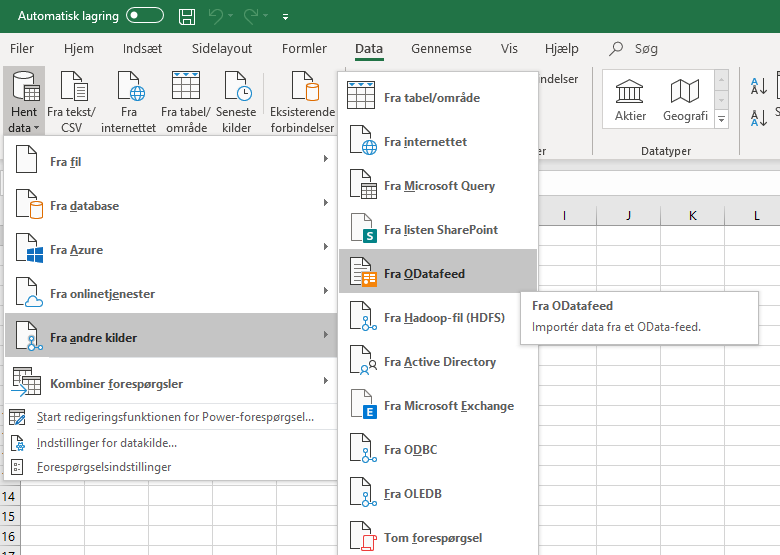
Åben excel 2016 eller Office 365 eller power BI
Klik på fanen data.
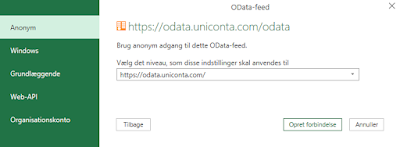
Indtast url: https://odata.uniconta.com/odata
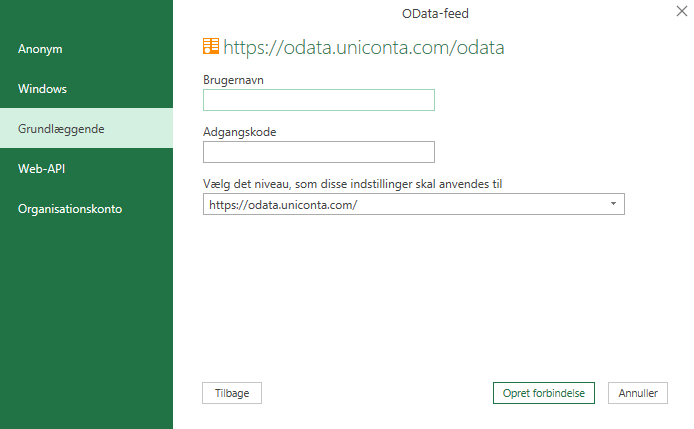
Benyt Menu punktet “Grundlæggende”
I brugernavn: Vigtigt Brugernavn: 004415/Brugernavn Der skal indsættes 2 nummer foran firmaid id hvis firmaid er 4 cifre. 4415 er firmaid som du finder i Uniconta.
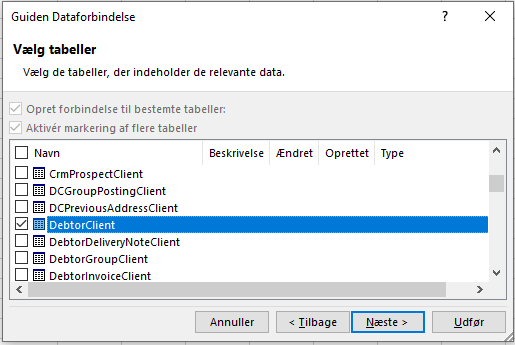
Vælg nu den Tabel du vil oprette forbindelse til
Når du skal opdatere regne arket Skal du trykke opdater.
Regnearket kan sendes til brugere der ikke har uniconta.
De skal dog indtaste legitimationsoplysninger igen.
Problem Excel gemmer din login oplysning i regnarket.og den automatisk logger ind.
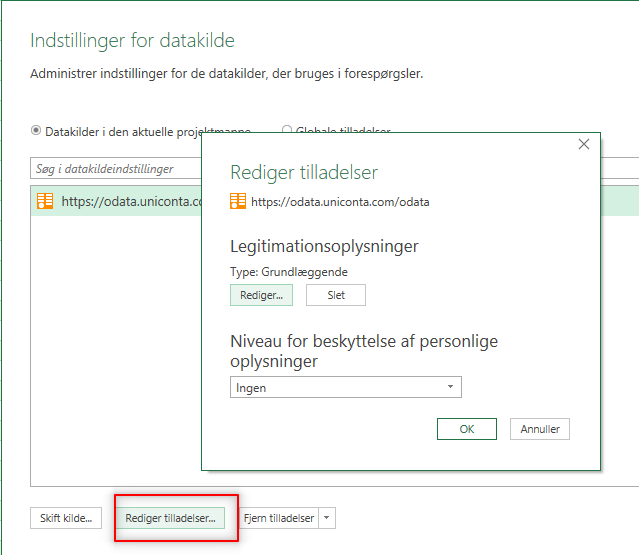
Vil du logge på et andet regnskab? skal man ændring sine login oplysninger
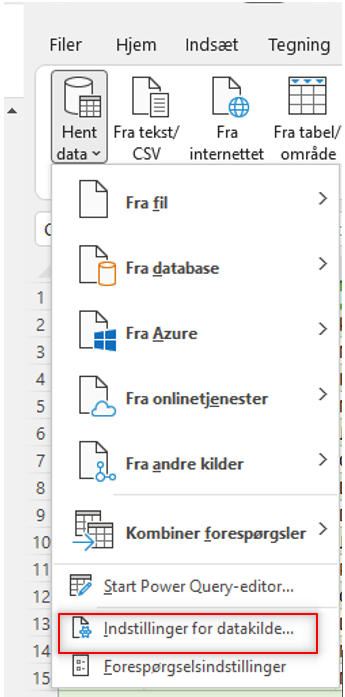
Tryk på “indstillinger for datakilde” for at redigere login oplysninger
PowerbiKlik på rediger tilladelser.
Har er opskrift hvis du vil forbinde til power bi.
Klik på Hent data.
Klik på hent data for at komme igang.
Søg på odata
url til odata: https://odata.uniconta.com/odata
Brugernavn: 004415/Brugernavn
004415 er lig med firma id som du finder under firma/firmaoplysninger
Adds the value of one numeric expression to another or concatenates two strings.
[UnitPrice] + 4
[FirstName] + ‘ ‘ + [LastName]
–
Finds the difference between two numbers.
[Price1] – [Price2]
*
Multiplies the value of two expressions.
[Quantity] * [UnitPrice] * (1 – [BonusAmount])
/
Divides the first operand by the second.
[Quantity] / 2
%
Returns the remainder (modulus) obtained by dividing one numeric expression by another.
[Quantity] % 3
|
Performs a bitwise inclusive OR on two numeric expressions. Compares each bit of its first operand to the corresponding bit of its second operand. If either bit is 1, the corresponding resulting bit is set to 1. Otherwise, the corresponding resulting bit is set to 0.
[Number] | [Number]
&
The bitwise AND operator. Compares each bit of its first operand to the corresponding bit of its second operand. If both bits are 1, the corresponding resulting bit is set to 1. Otherwise, the corresponding resulting bit is set to 0.
[Number] & 10
^
Performs a bitwise exclusive OR on two numeric expressions.
[Number] ^ [Number]
==
=
Returns true if both operands have the same value; otherwise, it returns false.
[Quantity] == 10
!=
Returns true if the operands do not have the same value; otherwise, it returns false.
[Country] != ‘France’
<
Less than operator. Used to compare expressions.
[UnitPrice] < 20
<=
Less than or equal to operator. Used to compare expressions.
[UnitPrice] <= 20
>=
Greater than or equal to operator. Used to compare expressions.
[UnitPrice] >= 30
>
Greater than operator. Used to compare expressions.
[UnitPrice] > 30
In (,,,)
Tests for the existence of a property in an object.
[Country] In (‘USA’, ‘UK’, ‘Italy’)
Between (,)
Specifies a range to test. Returns true if a value is greater than or equal to the first operand and less than or equal to the second operand.
[Quantity] Between (10, 20)
And
&&
Performs a logical conjunction on two Boolean expressions.
[InStock] And ([ExtendedPrice]> 100)
[InStock] && ([ExtendedPrice]> 100)
Or
||
Performs a logical disjunction on two Boolean expressions.
[Country]==’USA’ Or [Country]==’UK’
[Country]==’USA’ || [Country]==’UK’
~
Performs a bitwise negation on a numeric expression.
~[Roles] = 251
Not
!
Performs a logical negation on a Boolean expression.
Not [InStock]
![InStock]
+
Returns a numeric expression’s value (a unary operator).
+[Value] = 10
–
Returns the negative of a numeric expression’s value (a unary operator).
-[Value] = 20
Is Null
Returns true if an expression is a null reference, the one that does not refer to any object.